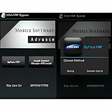
A free app for Android by Appswiz W.III.
MSA FRP
, like
Lucky Patcher
, is a
free Android bypass tool
that lets you override system settings to activate specific features. In this case, the app unlocks your Google Account through the browser on your mobile rather than a PC. It
turns off Google's Factory Reset Protection
(FRP), which eliminates the need for a flash.
Top Recommended Alternative
Avast One Free Antivirus
Ad
Free
4.3
IMEI Changer Pro IMEI Unlock
Free
4.5
In rare situations, you may be required to enter your Gmail password to unlock your Android phone. Don’t worry. MSA FRP will remember it for you. You'll also get the most latest updates, especially when it comes to
security
protocols, so your
data is secured.
How to change Android’s factory default settings
Because of Google's FRP policy, your Android may become locked at times. It prevents you from accessing your device, which might be upsetting. MSA FRP assists you by
circumventing the security procedure
using a
web browser
rather than a separate device, specifically, a PC. You don't need your
Gmail
password to obtain access to your Android smartphone thanks to the MSA FRP override technology.
It unlocks it using additional functionalities, which you can
access via a web browser
. Without a web browser on your phone, you will be unable to utilize this function and will need to find another means to unlock it. The genius of MSA FRP is that it already uses the Google account that’s already logged in to your phone to unlock the factory settings.
If your phone is stolen and FRP is on, they won't be able to use their accounts to unlock it. Until you use this technique to circumvent it, it will stay locked and
your data will be safe
. The biggest issue with the FRP is that if it's active, you shouldn't
hard reset
. If you lose your phone, you'll be
instantly locked out
since it's considered an effort to steal your information. If you make this error, MSA FRP can assist you to regain access.
Easily unlock your Android
If you've been locked out of your smartphone after a hard reset or if your phone was stolen and you recovered it, MSA FRP is an
incredibly useful tool.
You may have forgotten your Gmail password, but if you connect your account to this app, you may still log in.